Task 4: Density of States calculation
Electronic density of states is an important property of a material.
= number of electronic states in the energy interval
Calculating the Density of States (DOS) in Quantum ESPRESSO is typically a three-step process, beginning with a ground state calculation and ending with a dedicated post-processing tool.
The Three Core Steps for DOS Calculation
The standard workflow consists of the following steps:
-
Self-Consistent Field (SCF) Calculation: Run a ground state calculation using
pw.xto obtain the converged charge density and wavefunctions for your system . This is the mandatory starting point for all subsequent property calculations. -
Non-Self-Consistent Field (NSCF) Calculation: Perform a second
pw.xcalculation withcalculation='nscf'. This step uses the charge density from the SCF run but computes the Kohn-Sham eigenvalues on a much denser k-point mesh . This dense sampling is crucial for generating a smooth and accurate DOS plot. -
DOS Calculation with
dos.x: Finally, run thedos.xexecutable. This program reads the data produced in the NSCF step and computes the total Density of States, outputting it to a file .
Key Input Parameters and Considerations
Here are the critical parameters for each step, along with important notes for a successful calculation.
For the NSCF (pw.x) Calculation
The input file for this step is similar to your SCF file but with key modifications:
calculation: Must be set to'nscf'.occupations: It is highly recommended to set this to'tetrahedra'in the&SYSTEMnamelist. This enables the tetrahedron method for Brillouin zone integration, which is generally more accurate for DOS than smearing techniques .- K-Points: Define a much finer k-point grid (e.g.,
12 12 12or higher) than what was used in the SCF calculation .
For the DOS (dos.x) Calculation
This program uses a simple &DOS namelist. Below are the most important variables, based on the official documentation :
| Variable | Description & Recommendations |
|---|---|
prefix | The same prefix you used in your SCF and NSCF calculations . |
outdir | The directory containing the output from your NSCF calculation . |
Emin, Emax | The energy range (in eV) for the DOS plot, relative to the Fermi level . |
DeltaE | The energy step (in eV) for the DOS curve. A smaller value gives a higher resolution plot . |
fildos | The desired name for the output file containing the DOS data . |
Important Note on the Integration Method
dos.x automatically determines the method for broadening the discrete energy levels into a continuous DOS:
- It will use the tetrahedron method if your NSCF calculation used
occupations='tetrahedra'and you do not specify adegaussvalue in the&DOSnamelist . - Otherwise, it will fall back to Gaussian broadening, using parameters from either the
&DOSnamelist or the NSCF input file.
Task 4
We have created a new input file (scr/silicon/pw.scf.silicon_dos.in) which is very much the same as
our previous scf input file except some parameters are modified. We used the lattice constant value that
we obtained from the relaxation calculation.
We have increased the
ecutwfc to have better precision. We run the scf calculation:
pw.x < pw.scf.silicon_dos.in > pw.scf.silicon_dos.out
Next, we have prepared the input file for the nscf calculation. Where is have
added occupations in the &system card as tetrahedra (appropriate for DOS
calculation). We have increased the number of k-points to 12 × 12 × 12 with
automatic option. Also specify nosym = .TRUE. to avoid generation of
additional k-points in low symmetry cases. outdir and prefix must be the
same as in the scf step, some of the inputs and output are read from previous
step. Here we can specify a larger number of nbnd to calculate unoccupied
bands. Number of occupied bands can be found in the scf output as number of
Kohn-Sham states.
pw.x < pw.nscf.silicon_dos.in > pw.nscf.silicon_dos.out
Now our final step is to calculate the density of states. The DOS input file as follows:
&DOS
  prefix='silicon',
  outdir='./tmp/',
  fildos='si_dos.dat',
  emin=-9.0,
  emax=16.0
/
We run:
dos.x < pp.dos.silicon.in > pp.dos.silicon.out
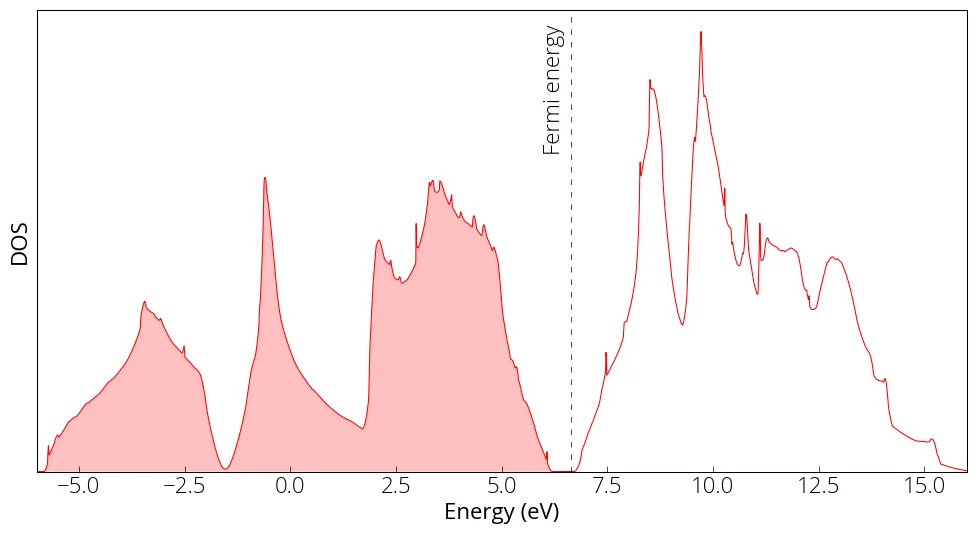
The DOS data in the si_dos.dat file that we specified in our input file. We
can plot the DOS:
import matplotlib.pyplot as plt
from matplotlib import rcParamsDefault
import numpy as np
%matplotlib inline

# load data
energy, dos, idos = np.loadtxt('../src/silicon/si_dos.dat', unpack=True)

# make plot
plt.figure(figsize = (12, 6))
plt.plot(energy, dos, linewidth=0.75, color='red')
plt.yticks([])
plt.xlabel('Energy (eV)')
plt.ylabel('DOS')
plt.axvline(x=6.642, linewidth=0.5, color='k', linestyle=(0, (8, 10)))
plt.xlim(-6, 16)
plt.ylim(0, )
plt.fill_between(energy, 0, dos, where=(energy < 6.642), facecolor='red', alpha=0.25)
plt.text(6, 1.7, 'Fermi energy', fontsize= med, rotation=90)
plt.show()
For a set of calculation, we must keep the prefix same. For example, the
nscf or bands calculation uses the wavefunction calculated by the
scf calculation. When performing different calculations, for example you
change a parameter and want to see the changes, you must use different output
folder or unique prefix for different calculations so that the outputs do not
get mixed.
Sometimes it is important to sample the point for DOS calculation (e.g., the conducting bands cross the Fermi surface only at point). In such cases, we need to use odd k-grid (e.g., 9✕9✕5).